- Data Science, Machine Learning, and AI
- Responsive AI
- Azure AI Services
- Azure AI Services and Containers
- Analyse Images with Azure AI Vision
- Azure AI-Language Service
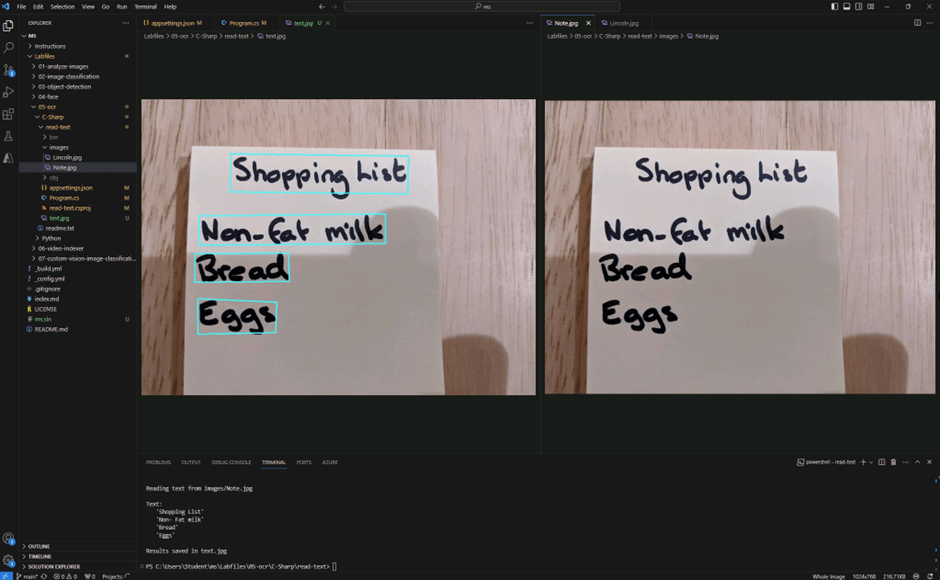
- Extracting text from images
- The translator services
- Question and answer solution
- Language understanding model
- Custom text classification
- Speech to text and text to Speech
- Azure OpenAI
- Azure AI Search
- Conclusion
- References:
For four days, I participated in a Microsoft training called “AI-102: Designing and Implementing a Microsoft Azure AI Solution.” During this training, I was exposed to a variety of Azure services that leverage AI power on applications and organisations. In this article, I want to share a review of these services so you can understand your options when it comes to Azure.
Before you go through the list of Azure AI Services, I want to point out a few concepts.
Data Science, Machine Learning, and AI
• Artificial intelligence: use to create intelligent software and agents.
• Machine Learning: use of data and algorithms to train predictive models.
• Data science: application of mathematical and statistical techniques to analyse data.
Responsive AI
Responsive AI is a global initiative based on six pillars:
• Fairness: “AI systems should treat all people fairly”—it doesn’t matter who interacts with AI; it will always be respectful, without bias or prejudice.
• Reliability & Safety: “AI systems should perform reliably and safely” – AI must never answer questions that put in risk the safety of the users.
• Privacy & Security: “AI systems should be secure and respect privacy” – your data safe, protected and encrypted.
• Inclusiveness: “AI systems should empower everyone and engage people” – AI to everyone.
• Transparency: “AI systems should be understandable”—you should always be transparent about using AI, including where and for what purpose, such as image generation or text generation.
• Accountability: “People should be accountable for AI systems.” – be aware of the impact on organizations, society and people’s lives when using AI.
Azure AI Services
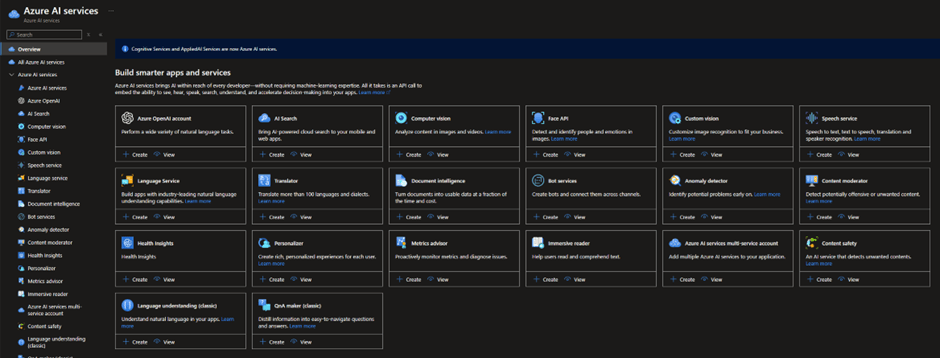
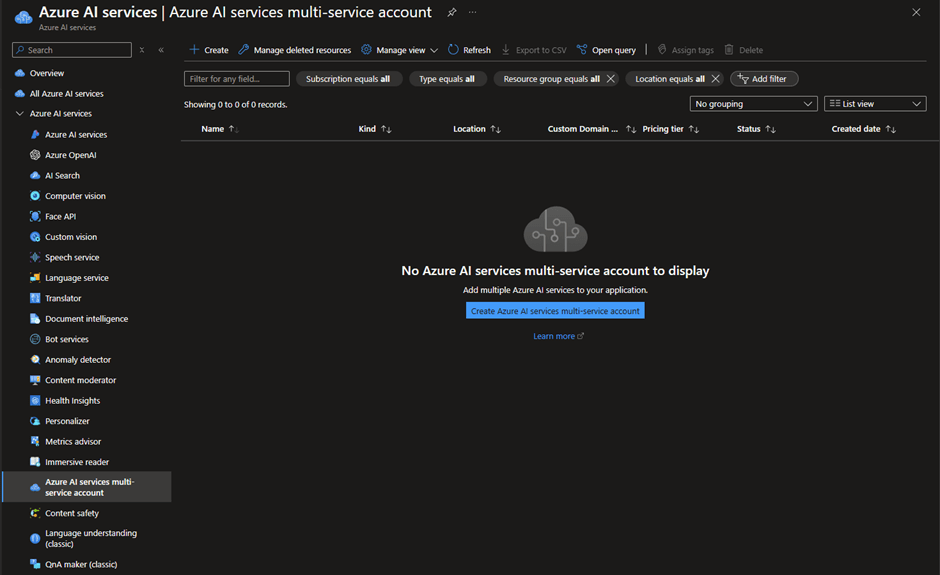
Azure AI Service is for developers without a machine learning experience where the existing models can be reused or customised. You have access to a variety of free tier services that allow you to test and use it in small workloads. It is sold using two commercial models: Single Model service and multi-model service. Whether you know your application use case you can opt to choose individual Azure AI capabilities (single model). The multi-model approach allows you to share the same endpoint across services and keys.
Azure AI Services and Containers
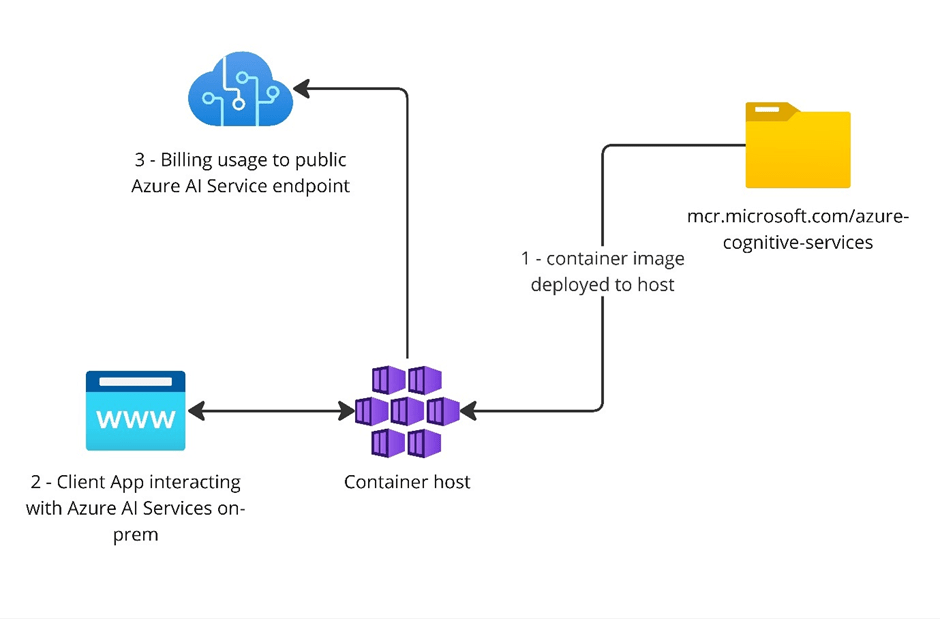
Several container images are available for commonly used Azure AI services APIs. You can deploy Azure AI Containers on-premises to get your data closer to AI Services for compliance, security or operational reasons. The Azure AI Service will be within your environment, processing your data locally and only sending billing data to the public Azure AI Service endpoint.
Analyse Images with Azure AI Vision
Azure AI Vision allows you to identify faces and objects, describe an image, and recognize text (OCR—Optical Character Recognition). The artificial intelligence capability provides pre-built models for image analysis, caption and tag suggestions, object detection, and background manipulation.
Note: The feature ‘Caption’ is not supported in this Australia East.
Detecting objects in an image and generating captions:
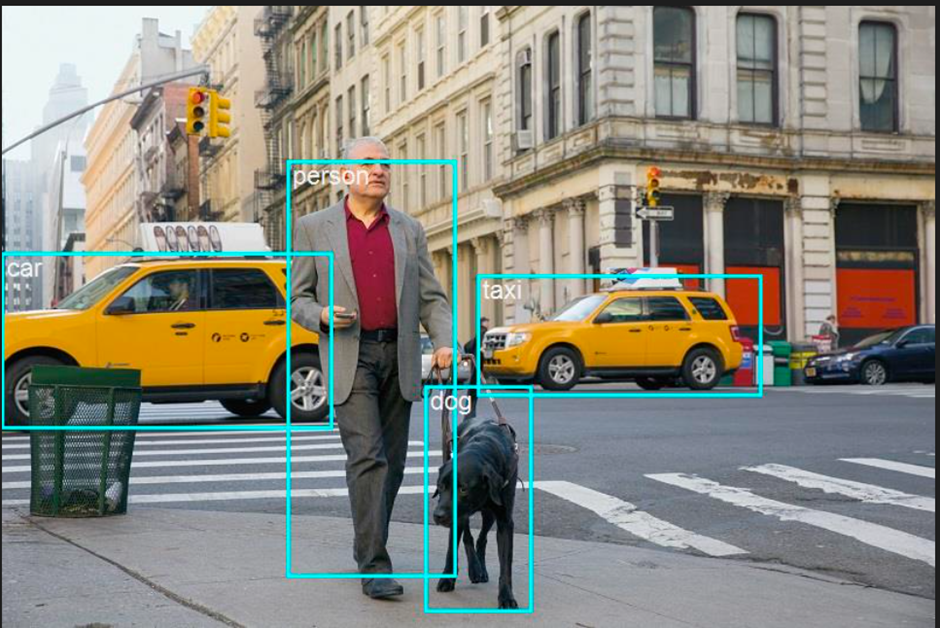
Caption:
   "a man walking a dog on a leash on a street", Confidence 0.82
 Dense Captions:
   Caption: 'a man walking a dog on a leash on a street', Confidence: 0.82
   Caption: 'a man walking on a street', Confidence: 0.69
   Caption: 'a yellow car on the street', Confidence: 0.78
   Caption: 'a black dog walking on the street', Confidence: 0.75
   Caption: 'a blurry image of a blue car', Confidence: 0.82
   Caption: 'a yellow taxi cab on the street', Confidence: 0.72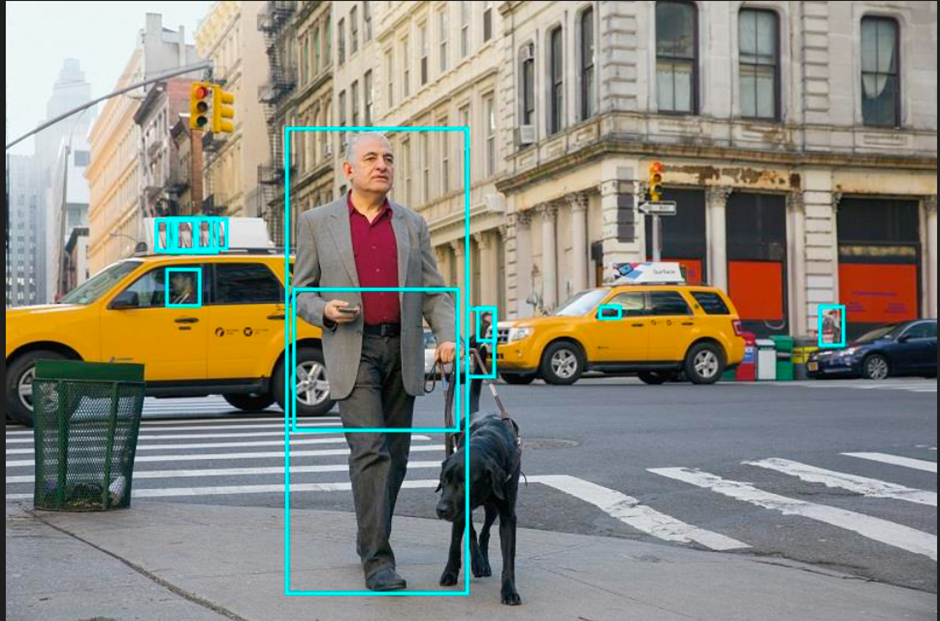
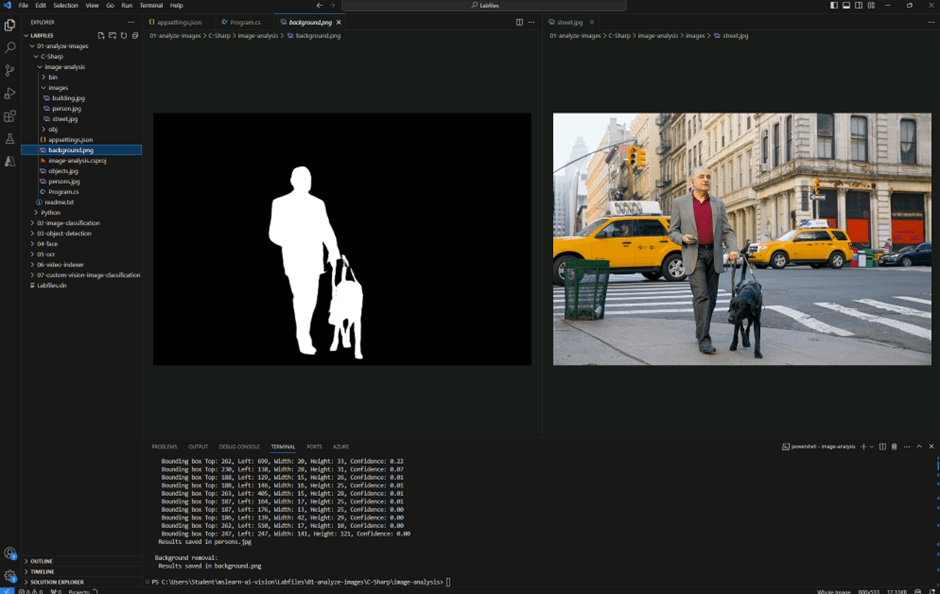
You can remove the background of an image or create a foreground matte of that image:
Azure AI-Language Service
This service uses NLP (Natural Language Processing) with preconfigured features:
• Language detection: determine the language in which the text is written.
• Key phrase extraction: extract the main concepts in a text.
• Sentiment analysis: identifies what people think about a topic.
• Named entity recognition: extract common entity categories in a text to identify the user’s intentions and labels.
• Entity linking: recognizes entities in a text and returns links to Wikipedia.
• Summarization: extract sentences to produce a summary of documents and conversations.
• PII detection: redact sensitive information. It can be used to apply sensitive labels or clean up data.
Extracting text from images
You can customize this service using Microsoft Tools to train an AI model that fits your needs specifically. In the example below, I used several images to train a model to correctly categorize an object.

Based on a text, I could extract language, sentiment, key phrases and entities.

Good Hotel and staff The Royal Hotel, London, UK 3/2/2018 Clean rooms, good service, great location near Buckingham Palace and Westminster Abbey, and so on. We thoroughly enjoyed our stay. The courtyard is very peaceful and we went to a restaurant which is part of the same group and is Indian ( West coast so plenty of fish) with a Michelin Star. We had the taster menu which was fabulous. The rooms were very well appointed with a kitchen, lounge, bedroom and enormous bathroom. Thoroughly recommended.Outputs:
Language: English

Sentiment: Positive

Key Phrases:
The Royal Hotel
Good Hotel
good service
great location
Buckingham Palace
Westminster Abbey
same group
West coast
Michelin Star
taster menu
enormous bathroom
Clean rooms
staff
London
UK
stay
courtyard
restaurant
part
plenty
fish
kitchen
lounge
bedroom

Entities:
staff (PersonType)
Royal Hotel (Location)
London (Location)
UK (Location)
3/2/2018 (DateTime)
rooms (Location)
Buckingham Palace (Location)
Westminster Abbey (Location)
stay (Event)
courtyard (Location)
restaurant (Location)
Indian (Skill)
West coast (Location)
fish (Product)
rooms (Location)
kitchen (Location)
lounge (Location)
bedroom (Location)
bathroom (Location)
The translator services
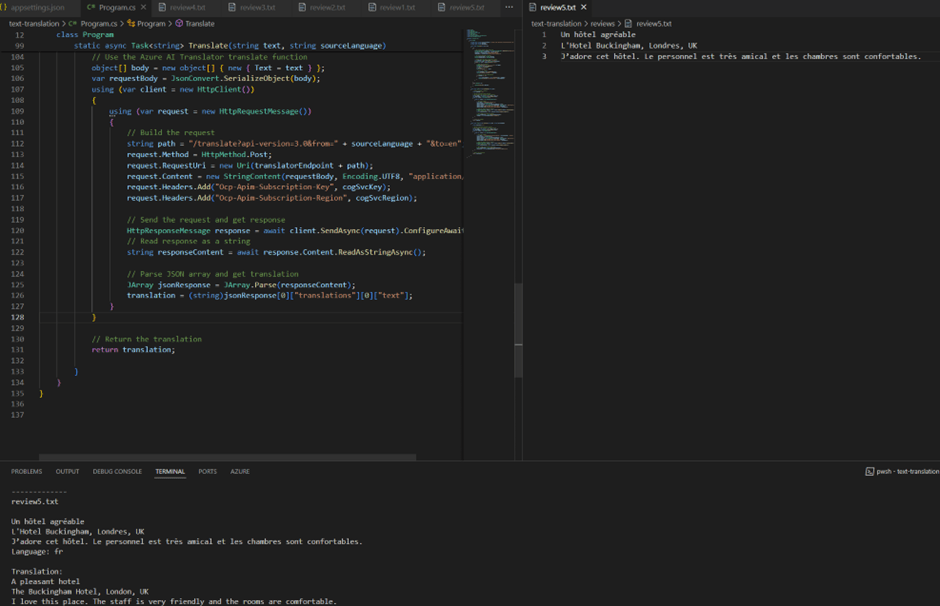
The translator service is a multilingual text translation REST API that supports language detection, one-to-many translations and script transliteration (converts characters or letters from a source to the corresponding characters or letters of a target language).
Question and answer solution
Frequent Asked Questions (FAQ) are one of the most common conversational scenarios that work well for a small set of questions. To provide this capability through Azure Language Studio, you can consume information from a web page or small document. A chatbot can consume the API and answer questions submitted by users. Custom Question Answering uses Azure Search to index and query the knowledge base of questions and answers.
The example below I added a laboratory’s FAQ web page as a source document in the Language Studio.
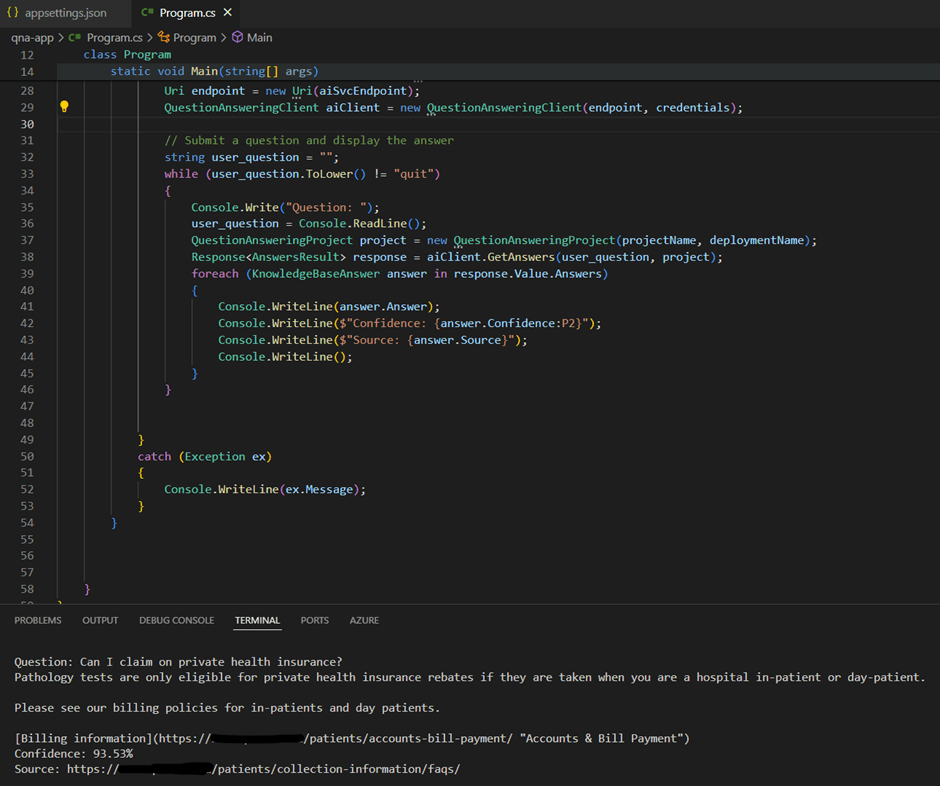
Note that the web page must be in the FAQ format, or Azure can’t import the content.
Language understanding model
Language services allow developers to understand user inputs and translate them into a structure that allows them to programmatically design solutions based on the user’s intent. The language service provides an interface through which a model can be trained to identify intents and entities in a conversation.
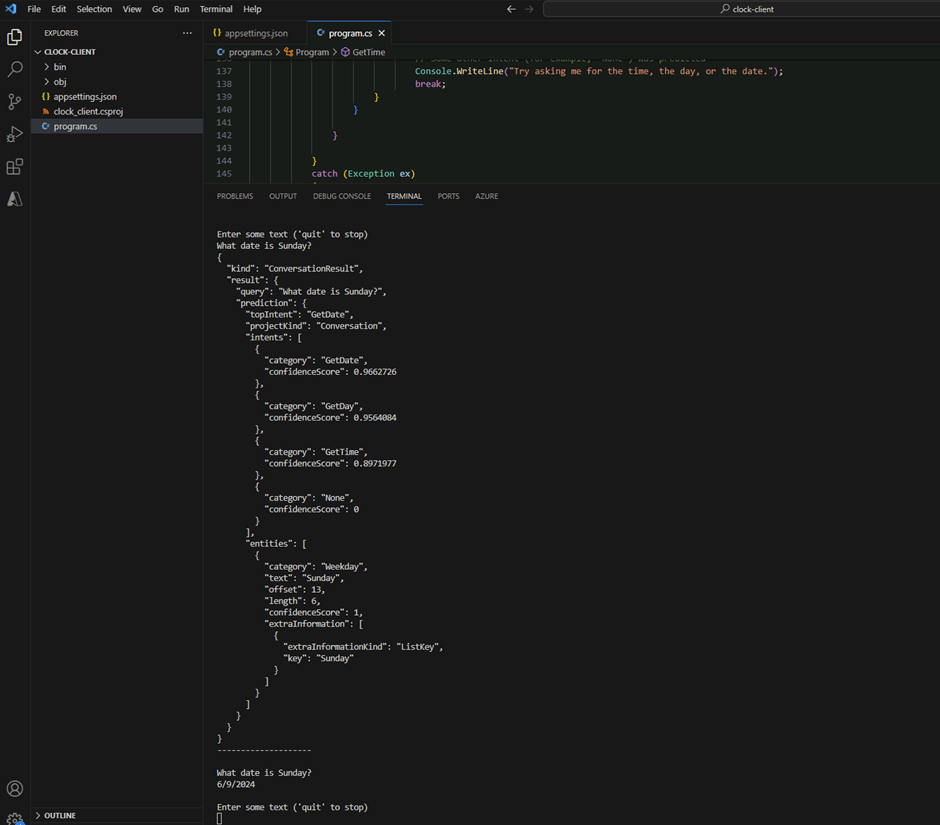
"kind": "ConversationResult",
"result": {
"query": "What date is Sunday?",
"prediction": {
"topIntent": "GetDate",
"projectKind": "Conversation",
"intents": [
"category": "GetDate",
"confidenceScore": 0.9662726
"category": "GetDay",
"confidenceScore": 0.9564084
"category": "GetTime",
"confidenceScore": 0.8971977
"category": "None",
"confidenceScore": 0
],
"entities": [
"category": "Weekday",
"text": "Sunday",
"offset": 13,
"length": 6,
"confidenceScore": 1,
"extraInformation": [
"extraInformationKind": "ListKey",
"key": "Sunday"
Custom text classification
Support centres and other industries can benefit from the custom text classification service to classify documents. Two good examples of this usage are assisting ticket triages at the support centre and identifying sensitivity labels in documents and e-mails.
Speech to text and text to Speech
The speech-related functionality includes an API that enables you to implement speech recognition and speech synthesis. You can use it to analyze audio and build an app that speaks naturally using a variety of voices, languages and accents.
Azure OpenAI
Azure OpenAI provides several pre-trained models that empower developers to create chatbots, language models, and other applications that are closer to natural human language. You can use the advantage of generative AI to provide domain knowledge conversations that enrich the user experience. The AI agent can maintain a history of conversations to create more accurate answers, creating an even more realistic conversational experience.
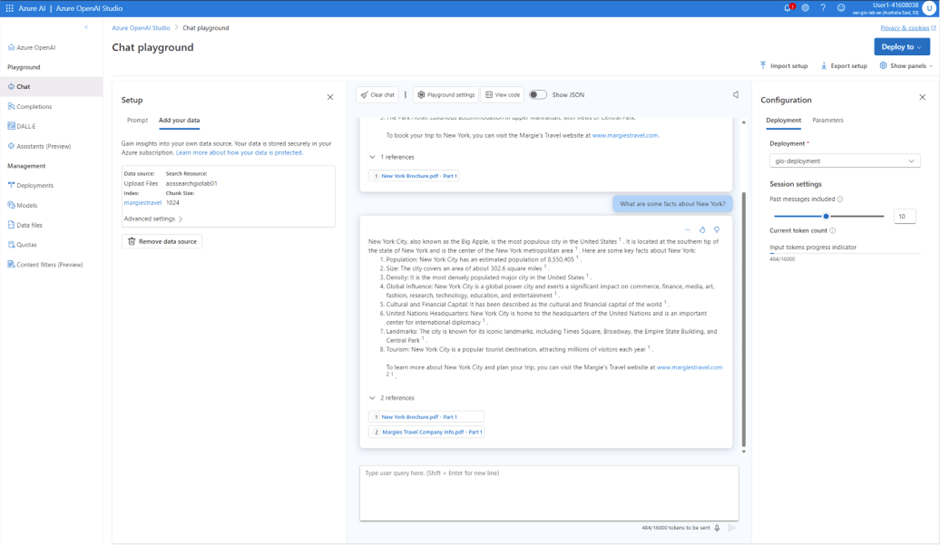
Azure OpenAI Studio enables you to connect and consume your data through data sources such as Azure Search and blob storage accounts.
Microsoft provides base models that you can start using when building with Open AI :
• GPT-4 models are the latest generation of generative pre-trained (GPT) models that generate natural language and code completions based on natural language prompts.
• GPT 3.5 models can generate natural language and code completions based on natural language prompts. In particular, GPT-35-turbo models are optimized for chat-based interactions and work well in most generative AI scenarios.
• Embedding models convert text into numeric vectors and are useful in language analytics scenarios, such as comparing text sources for similarities.
• DALL-E models are used to generate images based on natural language prompts. Currently, DALL-E models are in preview. DALL-E models aren’t listed in the Azure OpenAI Studio interface and don’t need to be explicitly deployed.
In the example below, I deployed a GPT 3.5 turbo model and enriched it with PDF documents provided during this course. OpenAI Studio has an interface that allows the developer to test the chat functionality. Using my data, the model returned answers based on the knowledge provided by the documents.
Azure AI Search
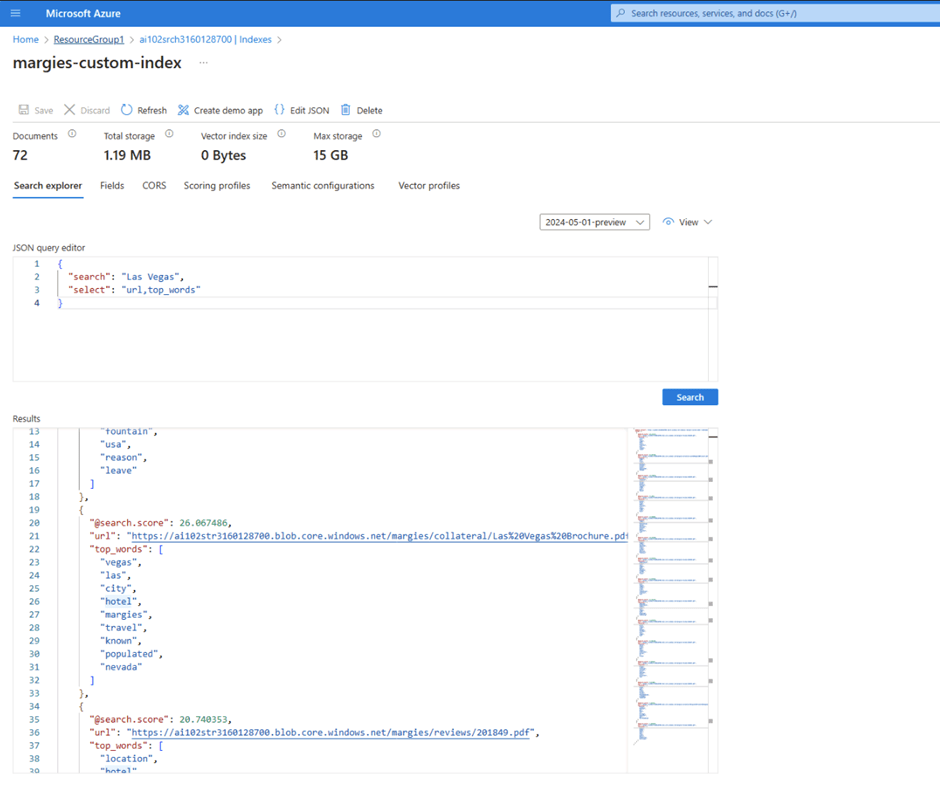
AI Search is a powerful indexing service for a range of sources, such as SQL Server Databases, Cosmos DB, and blob storage accounts. You can enrich your data with custom Skills that allow you to integrate external APIs during indexing. The indexer maps all data source fields and skillset outputs to index fields.
Whether you have data in a structured or unstructured format, Azure AI Search can extract insights from this data and enable applications to search and analyze them.
In the example below, I created a custom Skill using Azure Function to enhance the index with a new property, “top_words.” The indexer called my function for each document, storing the response in Azure AI Search.
Conclusion
As you can see in this article, you don’t need to be a scientist in AI to implement various solutions using Azure AI Services. Microsoft invests a lot in creating services and tools that enable developers to create AI solutions easily. By building chatbots or modernizing applications, developers can count on various APIs and integrations provided by Azure AI Services. That’s all, folks! AI to everyone, including developers. If you are looking for a recommendation for “AI-102: Designing and Implementing a Microsoft Azure AI Solution”, go for it. You will obtain a deep understanding of Azure AI Services and how these services combined can leverage the power of AI in your applications. Be aware that some features aren’t fully available in Australia. Enjoy the Free tier for all services to create your apps!
References:
- Empowering responsible AI practices | Microsoft AI
- Create a multi-service resource for Azure AI services – Azure AI services | Microsoft Learn
- Use Azure AI containers on-premises – Azure AI services | Microsoft Learn
- What is Azure AI Vision? – Azure AI services | Microsoft Learn
- What is Azure AI Language – Azure AI services | Microsoft Learn
- What is Azure Text Translation? – Azure AI services | Microsoft Learn

 Gio The Dev .NET
Leave a comment