This is a comparison of low-cost solutions for building up an Event-sourcing database using Cosmos DB without coding.
Introduction
In this article, we will have a look at different messaging solutions for creating an event-sourcing database using Cosmos DB. You will see the Azure resources we can integrate with Cosmos DB. As well as, compare a few other solutions using Event Hubs, Service Bus, Stream Analytics Job, Functions, Logic App and Event Grid.
Context
Nowadays, with the advent of Software as a Service (SaaS), any company can subscribe to a software to perform some kind of business task. In fact, the democratisation of the software allows the industry to quickly respond to the needs of the business, which is very good for those who want to innovate, grow, comply with legislation, or execute their activities using digital technologies.
Nevertheless, this intense scenario where an organisation relies on different software platforms to execute their activities leads to a chaotic ecosystem where systems integration happens through file transfer, ETL platforms, automation tools, and batch systems – a real “spaghetti”. After that, all these integrations lack of efficiency, synchronism, and reliability.
Modern applications often provide API integration, web-hooks or outbound events to a message broker. I consider the last one, one of the most effective integration patterns – called Event Sourcing. Legacy systems might not have this capability, requiring significant effort to integrate.
High-Level Solution Design
This solution doesn’t cover how events ended up into a message broker but demonstrates scenarios where companies can benefit from event streaming tools to build up an Event database without a line of code. With the Event Database in hand, we can play as we want. A variety of solutions can be made up. Examples are creating a master database with all the company’s data for data analytics, real-time system integration, data projections for optimal querying performance, single source of truth.
Once you integrate your system into a message broker or event stream tool, we can build an Event-sourcing database.
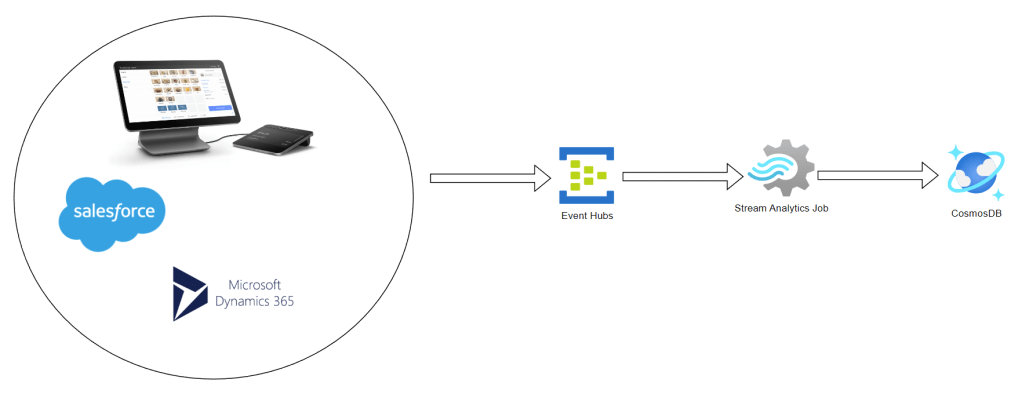
Why use Cosmos DB?
Cosmos DB has been playing a significant role in event integration and data ingestion in general because of characteristics such as schemeless, high throughput, low cost, and the change feed design pattern. The Change Feed feature allows us to play all sequences of events stored into the database orderly. In other words, we can reprocess events to create new projections or analyse your data at some point in time.
Message or Events
Note that I’m using terms like “Events” and not “Messages”. This is due to the fact there are conceptual differences. Messages are essential mechanisms for a component to communicate with another. The message contains a datapoint that cannot be missed. They are often translated into “commands”, hence into actions, publisher’s conveying a publisher’s intent and then requiring work to be done. On the other hand, Events are a consequence of messaging. They communicate that an action has been executed for any interested listener, with no specific target. They are often used for representing a discrete business logic activity or statistical evaluation.
What is Event Hubs?
“Azure Event Hubs is a Big Data streaming platform and event ingestion service that can receive and process millions of events per second. Event Hubs can process, and store events, data, or telemetry produced by distributed software and devices. Data sent to an event hub can be transformed and stored using any real-time analytics provider or batching/storage adapters.” – Microsoft
The choice of Event Hubs as an event ingestion service was due to the following reasons:
- Low latency
- Can receive and process millions of events per second
- At least once delivery of an event
- User interface for data stream processing pipelines called Stream Analytics Job
What is Stream Analytics?
“Azure Stream Analytics is a fully managed stream processing engine designed to analyse and process large volumes of streaming data with sub-millisecond latencies. Patterns and relationships can be identified in data that originates from a variety of input sources including applications, devices, sensors, clickstreams, and social media feeds. These patterns can be used to trigger actions and initiate workflows such as creating alerts, feeding information to a reporting tool, or storing transformed data for later use.” – Microsoft
Using Event Hubs and Stream Analytics Job
1. Create an instance of Cosmos DB
2. Create an instance of Event Hubs Namespace
3. Create an Event Hub within the Event Hubs Namespace
Creating a Stream Analytics Job
1. Access the Event Hub and got to process data

2. Select Materialize data in Cosmos DB
3. Provide a name for your Stream Analytics Job
4. For this example, we will not modify the event’s payload. Remove all unnecessary components.
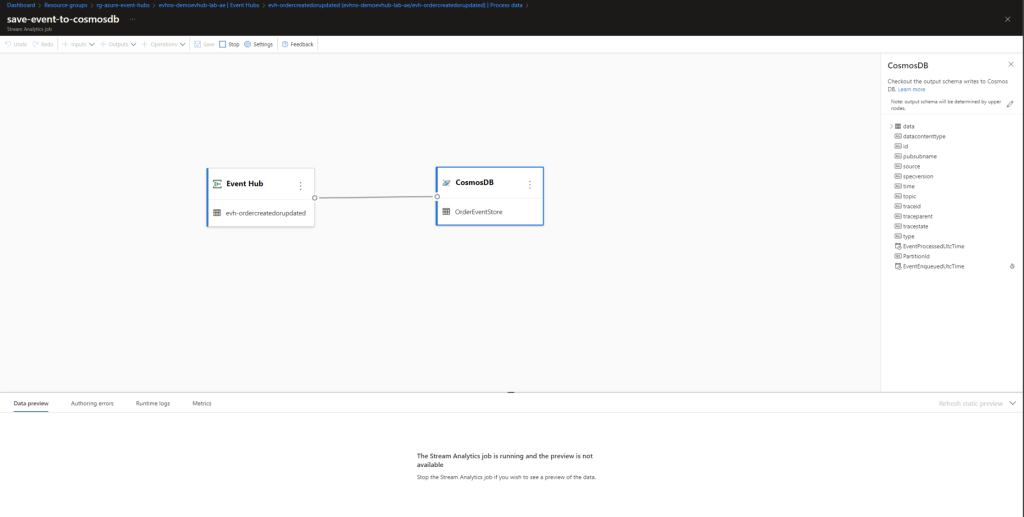
5. Save and click on Start.
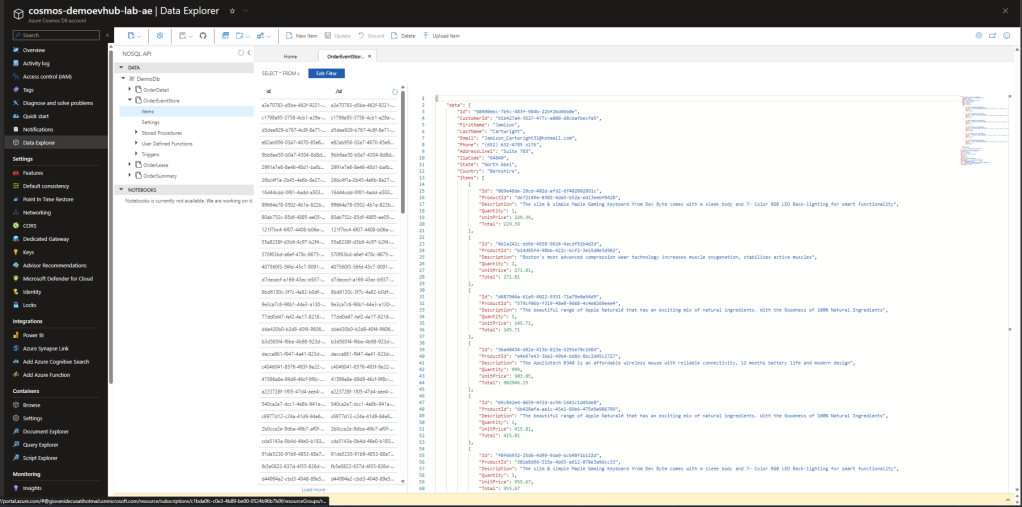
6. That’s it! Easy peasy! No line of code! You have all your events flowing into your Cosmos DB.
Event Hubs and Stream Analytics
- Azure Event Hubs Basic Tier AUD$ 16.28
- Azure Stream Analytics Type Standard V2 with 1/3 Streaming Unit AUD$ 152.78
The virtual network integration for Stream Analytics is still in preview.
Side note: Prices were calculated based on Azure Prince Calculator of 21st August 2023.
Candidate Solutions
Take a moment to look into different approaches. I have provided the required cost to run the same solution using Service Bus because is more common for enterprise applications that require transactions, ordering, duplicate detection, instantaneous consistency and dead-letter features.
Service Bus and Azure Function
Service Bus requires developing effort. You must code an Azure Function, container app, Web Job, Logical App, etc. to process a message from a topic. Remember, more code, more liability, maintenance, testing and cost. Let’s suppose you are going to use Azure Function. Azure Functions integrates with Azure Service Bus via triggers and bindings. Integrating with Service Bus allows you to build functions that react to and send queue or topic messages.
- Azure Service Bus Standard Tier AUD$ 14.58
- Azure Function with dedicated App Service Plan and Standard Tier AUD$ $136.72
- Azure function with consumption Tier Free.
Perhaps Azure Function Consumption Tier is Free for 1M requests which is rare in an enterprise solution. The consumption plan doesn’t offer virtual network Integration or warm start-up.
Service Bus and Logic App
Logic App offers built-in connectors to enable you to control your workflows. It comes with an IDE called Logic App Designer on Azure Portal – you can drag/drop components for creating your pipeline. Azure Service Bus connector performs actions such as send to queue, send to topic, receive from queue, and receive from subscription, which are available on Logic Apps consumption plan. However, the consumption plan doesn’t allow virtual network integration.
- Logic App Standard Plan (Single-Tenant) Tier WS1 1 vCore, 3.5 Gib RAM 250 GB Storage AUD$ 277.89
- Logic App Consumption Plan The first 4,000 actions are free.
Side note: Azure Cosmos DB trigger is not available on the consumption tier. You won’t be able to fire an event coming from Cosmos DB. This connector is currently in preview for the standard tier.
See what Logic Apps Design looks like:
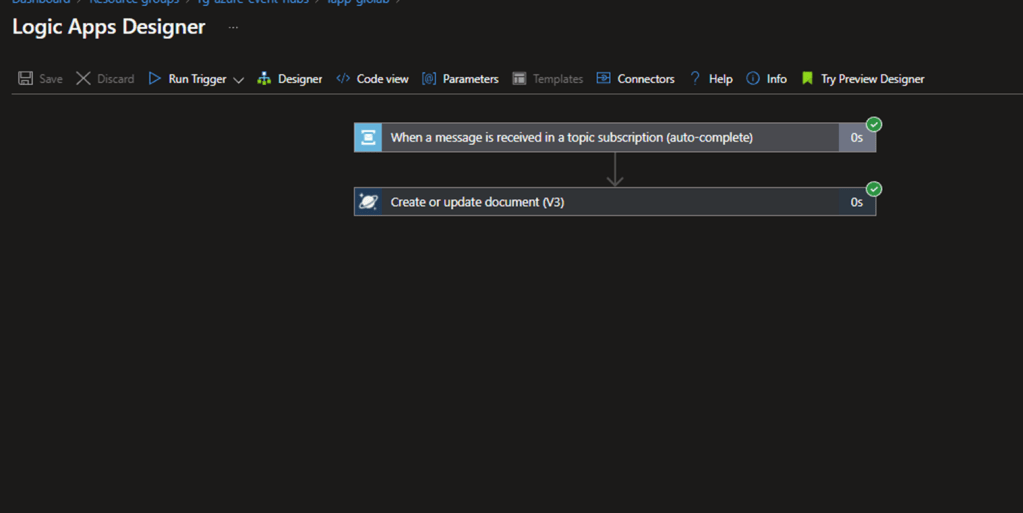
Side note: messages coming from Service Bus must be decoded using the decodeBase64 function on the document property of cosmos db action.
Event Hub and Logic App
This is a valid solution. However, we must consider the limitations and price mentioned above. Event Hub triggers are long-pooling triggers that run-in intervals of 30 seconds. It continues ingesting events until the event hub is empty and skips the trigger when it is empty.
Event Grid
Unfortunately, it is only available in a few regions and it is not compatible with Stream Analytics Jobs requiring development effort. Event Grid routes events from Azure and non-Azure resources. It can be easily integrated with 3rd party applications. Event Grid supports CloudEvents which is a common standard for system integrations. Here is an example of how much it costs:
- 5M Published + 5M Delivery events: 10 million operations
- Monthly free grant of 100,000 operations
- Total monthly cost 9.9 million X $0.941 = AUD$9.315
Conclusion
In this article, I mentioned the challenges we face when integrating multiple systems and the benefits of building an Event-sourcing database. I have demonstrated how to use Azure Technologies such as Event Hub, Stream Analytics Job and Cosmos DB to ingest events and store them into Cosmos DB – a task that takes a few minutes and makes no line of code. We have compared different data ingestion approaches that store events in Cosmos DB as well. The solution utilising Event Hub and Stream Analytics seems to address the problem better because it is aligned with the event’s definition and offers a competitive price. Logic App might be an interesting solution if limitations are considered. I found it easy to work with the design tools of either Stream Analytics or Logic App. What makes you choose between one solution is your project’s context. Companies that already have Service Bus might decide to use solutions aligned with it. Now you know the potential of using Azure resources together and can get rid of the hassle of all those old-fashioned integration patterns. Get your company ready for any kind of integration and achieve ownership of your data.
References
- Compare Azure messaging services – Azure Service Bus | Microsoft Learn
- What is Azure Event Hubs? – a Big Data ingestion service – Azure Event Hubs | Microsoft Learn
- Process data from Event Hubs Azure using Stream Analytics – Azure Event Hubs | Microsoft Learn
- Introduction – Azure Cosmos DB | Microsoft Learn
- Azure Service Bus bindings for Azure Functions | Microsoft Learn
- Azure Functions scale and hosting | Microsoft Learn
- Azure Quickstart – Create an event hub using the Azure portal – Azure Event Hubs | Microsoft Learn
- Materialize data in Azure Cosmos DB using no code editor – Azure Stream Analytics | Microsoft Learn
- Introduction to Azure Stream Analytics – Azure Stream Analytics | Microsoft Learn
- Built-in connector overview – Azure Logic Apps | Microsoft Learn
- Service Bus – Connectors | Microsoft Learn
- Run your Stream Analytics in Azure virtual network – Azure Stream Analytics | Microsoft Learn
- Connect to Azure Cosmos DB – Azure Logic Apps | Microsoft Learn
- Connect to Azure Event Hubs – Azure Logic Apps | Microsoft Learn
- Working with the change feed – Azure Cosmos DB | Microsoft Learn

 Gio The Dev .NET
Leave a comment